Case study
Flamey AI sequence creation
Integrating AI into the core workflow so sales reps go from intent to launch in minutes, not forms.
Flamey is a fictional company created for a Foundey design challenge. Foundey is a UI/UX design agency built for startup founders.
The product
Flamey AI helps B2B sales teams create and run outreach sequences.
The user
SDRs and founders who need speed, control, and personal voice.
The outcome
A redesigned flow where AI generates the first draft, then stays close during editing and preview.
1. Problem
Sales reps want AI powered sequences, but current tools make them work for the AI instead of AI working for them. The current sequence creation flow treats AI as a separate helper you consult (sidebar chat), rather than an integrated partner that proactively generates and refines content. This creates friction, increases cognitive load, and underutilises the most valuable feature: the AI itself.
Core tension
- AI exists, but it is not in the workflow.
- Users do manual translation instead of direction.
2. How might we
How might we integrate Flamey's AI Assistant directly into sequence creation so it becomes a copilot that generates and optimises sequences, instead of just offering advice?
Build confidence in AI generated content
Visualise temporal sequences better than numbered lists
Help users preview exactly what prospects will see
Insight: It's clear from the brief that Flamey already has AI. The challenge is integration, not invention.
3. Personas

Sarah
Sales Development Representative (primary)
26 - San Francisco
\"I want AI to do the heavy lifting, but I need to feel like it's still my voice, not a robot.\"
- Create sequences in under 5 minutes
- Maintain personal voice while using AI
- See what prospects will actually receive
- Increase reply rates without more manual work
- I know what works, I just do not have time to set it all up
- Sequence creation takes too long (15+ min per sequence)
- Copy pasting between AI chat and the builder is tedious
- Never sure if emails look good on mobile until after launch
- Overwhelmed by all the fields and options upfront
Traits
Time sensitive, detail oriented, data driven
Tech savviness: medium high
AI comfort: comfortable but sceptical of generic outputs

Marcus
Founder and CEO (secondary)
32 - Toronto (remote)
\"I need this to just work so I can get back to building product.\"
- Create first sequence in under 10 minutes
- Use AI to compensate for lack of sales expertise
- Set it and forget it automation
- I do not have time to learn another complex tool
- Too many sales tools with steep learning curves
- Needs templates and guidance, not blank canvases
- Struggles with writing compelling copy
- Forgets where he left off in sequence creation
Traits
Pragmatic, impatient with complexity, wants quick ROI
Tech savviness: very high
AI comfort: excited but expects magic

Jessica
Account Executive (tertiary)
29 - Montreal
\"AI is great but my prospects can tell when it's robotic.\"
- Create sophisticated, personalised sequences
- Maintain authentic relationships at scale
- Test and optimise performance
- Keep full control over tone and content
- Generic AI templates make me sound like everyone else
- Needs heavy customisation to match voice
- Worried prospects can tell it is AI written
- Existing sequences need frequent updates
- No way to test different approaches
Traits
Relationship focused, perfectionist, wants control and efficiency
Tech savviness: medium
AI comfort: cautious
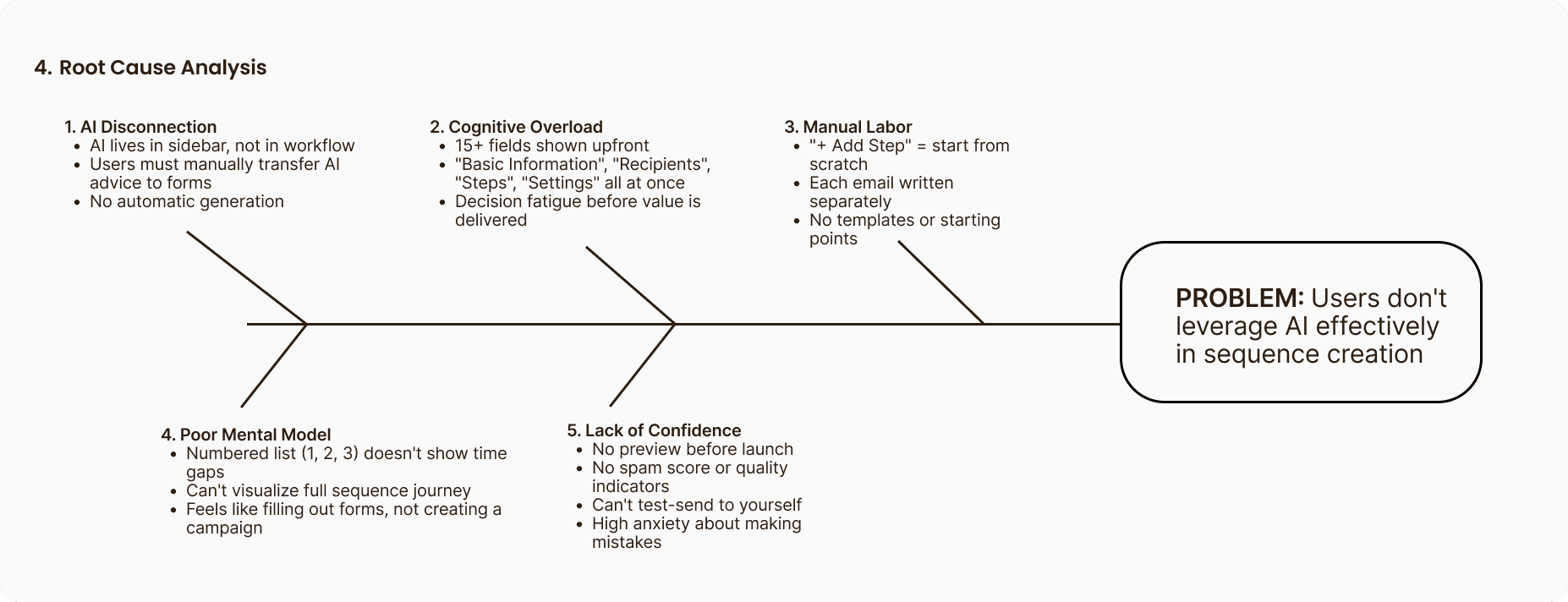
4. Root causes
The audit revealed five core issues driving friction in the current flow.
- AI disconnection
- Cognitive overload
- Manual labour
- Poor mental model
- Lack of confidence
5. Design audit
Usability
2 / 5All fields shown upfront, manual step creation, no progressive disclosure, generic error handling. Strengths: clean visual design, logical field organisation.
Impact
Estimated 40% abandonment for first sequence.
AI integration
2 / 5AI exists but disconnected, manual implementation of advice, no auto generation, generic tips, no contextual suggestions. Strength: assistant works.
Impact
Under 20% of users leverage AI effectively.
Information architecture
3 / 5Linear flow, numbered list does not show time relationships, all sections visible so hierarchy is unclear. Strengths: clear left navigation, consistent layout patterns.
Impact
Users cannot visualise the campaign or navigate efficiently.
Visual design
4 / 5Professional appearance, good spacing, good typography hierarchy, consistent component design. Gaps: limited use of brand orange, no feedback for AI actions.
Impact
Foundation is strong, enhancements not redesign.
Preview and confidence
1 / 5No preview, no mobile preview, no spam score, no test send, no personalisation preview, no confidence scoring.
Impact
High anxiety and high post launch edit rate.
Note: metrics in this case study are illustrative for the exercise.
6. Competitive audit
| Feature | Apollo | Attio | 11x | Flamey | New solution |
|---|---|---|---|---|---|
| AI generation | None | None | Strong | Exists but disconnected | Integrated |
| Visual timeline | List view | Good | Complex | Numbered list | Clear timeline |
| Template library | Strong | Limited | None | None | AI powered |
| Mobile preview | None | None | None | None | Yes |
| Ease of use | Medium | High | Low | Medium | Very high |
| AI integration | None | None | High | Low | Very high |
Key insight
Flamey has AI (which Apollo and Attio lack) but does not integrate it as well as 11x. However, 11x is too complex. Opportunity: combine 11x's AI power with Attio's simplicity.
7. User journey and gaps
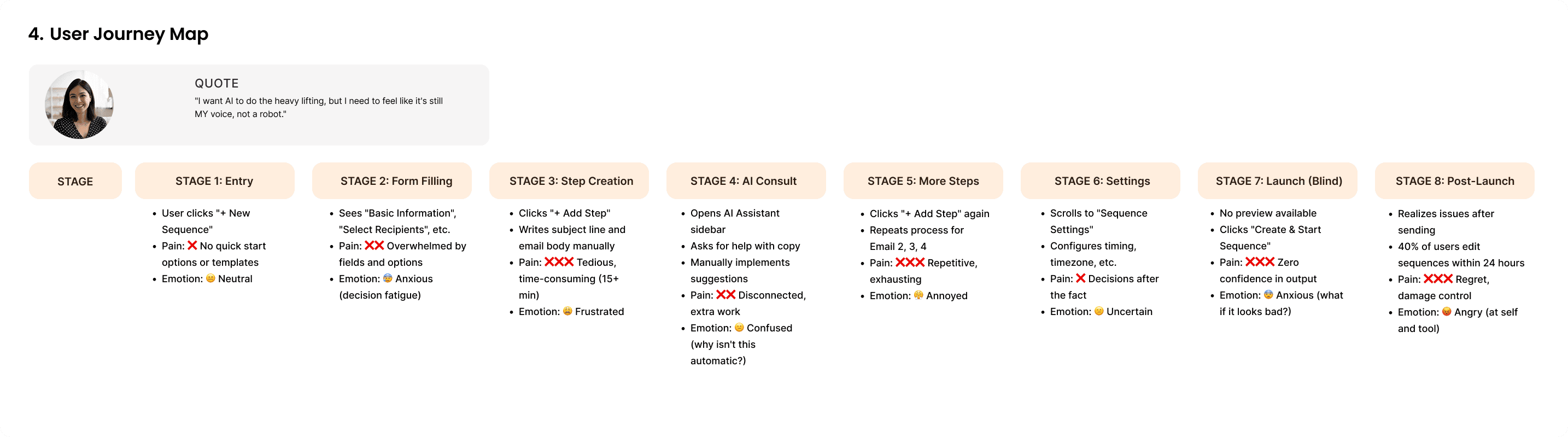
AI disconnection
Current
AI Assistant is separate sidebar chat
Problem
Users must manually implement advice
Impact
Low AI utilisation, long creation time
Fix
Integrate AI as embedded copilot
No auto generation
Current
Users click add step and write each email
Problem
Manual labour defeats purpose of AI
Impact
Slow creation, inconsistent quality
Fix
AI generates multi step sequence from brief
Poor visualisation
Current
Numbered list
Problem
Cannot see time gaps or flow
Impact
Hard to plan cadence
Fix
Timeline view (day 0, day 2, day 5, day 7)
Cognitive overload
Current
All fields and options shown upfront
Problem
Decision paralysis and abandonment
Impact
Low completion rates
Fix
Progressive disclosure, start with three questions
8. Opportunity sizing and recommendations
Opportunity sizing
Time savings
Current: 15 to 20 min per sequence
Proposed: 3 to 5 min per sequence
Impact: 70 to 80% reduction, more sequences created
Completion rate
Current: about 40% complete first sequence
Proposed: above 85%
Impact: about 2x activation rate
AI utilisation
Current: under 20% effective use
Proposed: above 70% content acceptance
Impact: better leverage of core feature
User satisfaction
Current: frustration, regret, anxiety
Proposed: confidence, delight, efficiency
Impact: higher retention, lower churn
Business outcomes
More sequences per user, higher engagement
Better sequences, higher reply rates, more revenue
Faster time to value, better activation
What to keep
Strengths to preserve
1. Clean visual design
- Professional appearance
- Good spacing and typography
- Consistent component design
- Keep: visual language and design system
2. Data table design
- Clear performance metrics
- Status indicators
3. Left sidebar navigation
- Clear app structure
- Easy access to features
- Consistent location
- Keep: navigation pattern
4. AI assistant foundation
- Technically functional
- Can answer questions
- Has potential
Recommendations
Immediate priorities
- Integrate AI into core flow (embedded copilot, auto generate sequences, inline suggestions)
- Add timeline visualisation (replace numbered list, click to edit, clear day spacing)
- Build preview system (mobile and desktop preview, spam score, personalisation preview)
Secondary priorities
- Progressive disclosure (start with three questions, hide advanced options until needed)
- Smart templates (learn from past sequences, suggest starting points, adapt to user voice)
Note: metrics in this case study are illustrative for the exercise.
9. Proposed solution
Before
- Form heavy flow
- AI in sidebar
- Manual step creation
- No preview
After
- Intent capture first
- AI generates sequence draft
- Timeline editor shows day spacing
- Preview and quality checks before launch
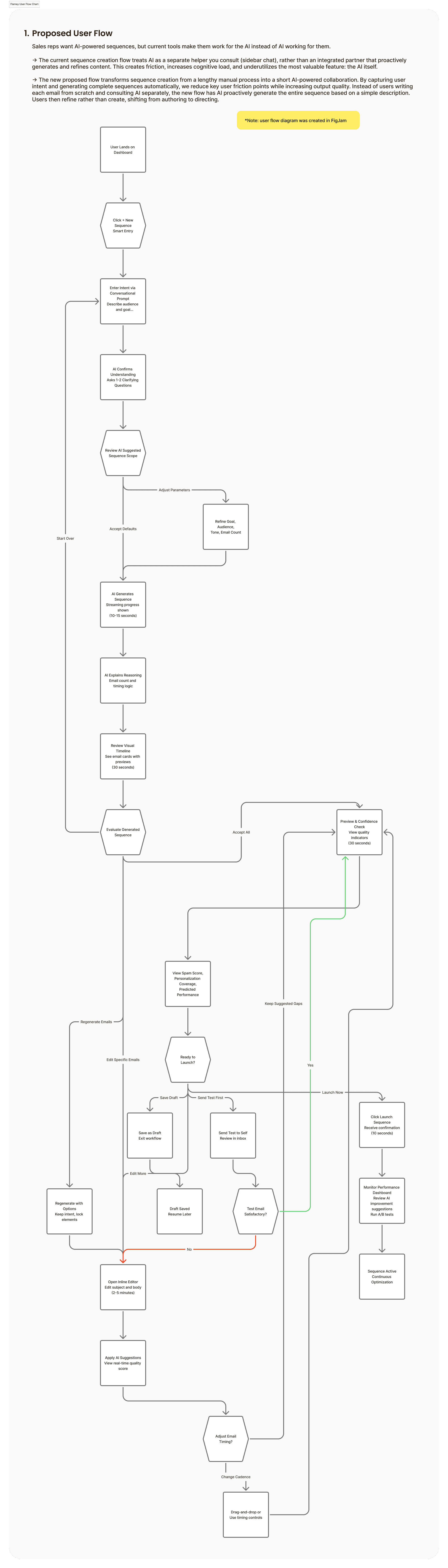
10. Low fidelity prototypes
- Conversational brief replaces multiple fields
- AI confirms understanding
- User stays in control
- Streaming generation
- Transparency on changes
- Clear next step
- Day based timeline
- Click to edit
- Inline suggestions
- Mobile preview
- Quality checks
- Confident launch
11. High fidelity prototypes
Design decisions
- Kept UI light and text first because sequence creation is content heavy.
- Orange is used sparingly so it stays meaningful and signals AI assist moments.
- Spacing follows Chakra conventions so the designs feel consistent and buildable.
- Overall goal: fast and guided, without removing user control.
12. Next steps
Validate
Usability test with SDRs for time to first sequence and comprehension of timeline.
Measure
Completion rate, time to launch, AI acceptance rate, post launch edits.
Iterate
Tone controls, template suggestions, experimentation and testing support.