Web design · Frontend development
Reviewer.ly Website Redesign
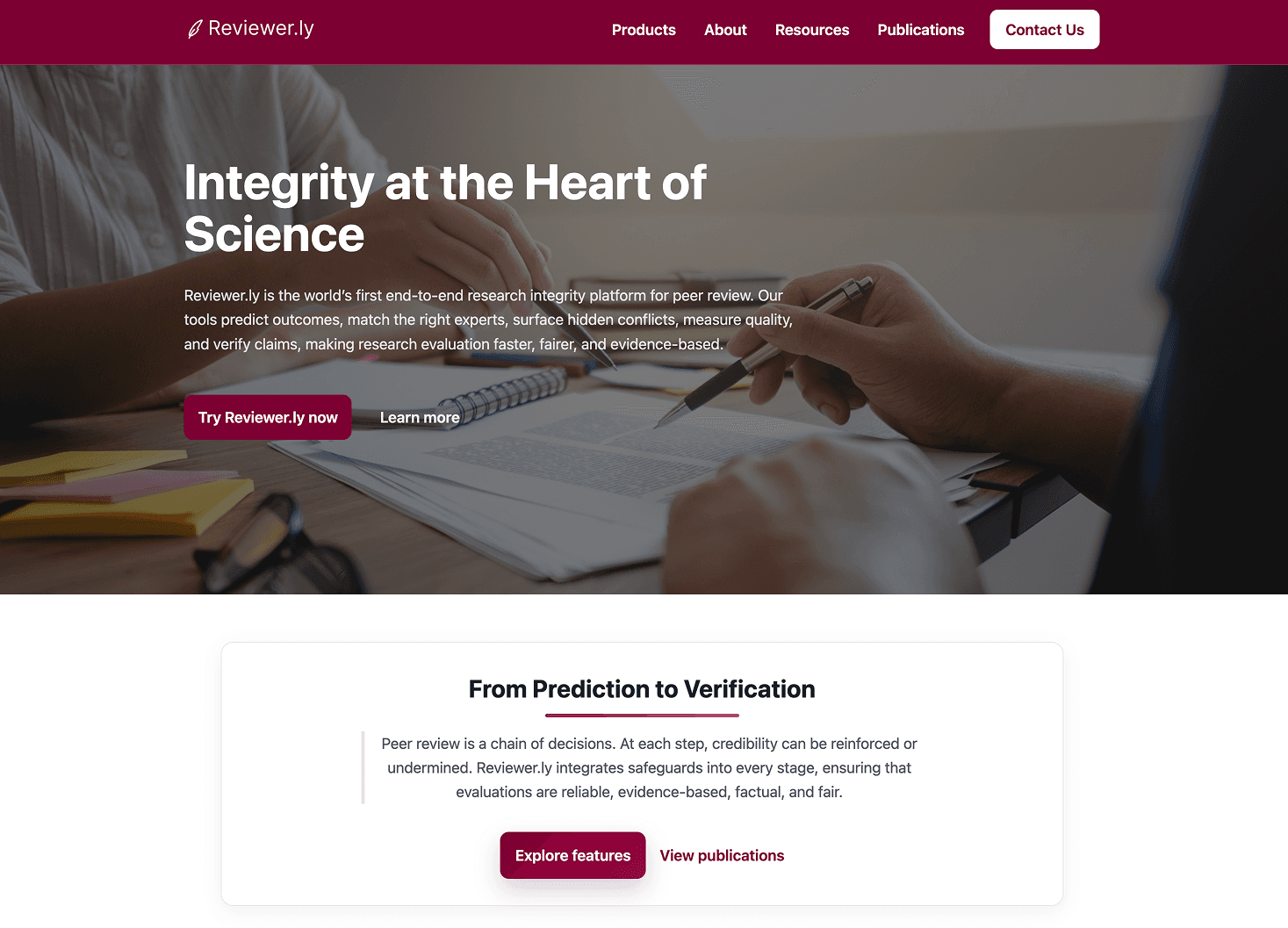
Replacing an outdated, unresponsive WordPress site with a fully redesigned frontend that clearly communicates an AI peer review platform to journals, publishers, and research institutions.
Role
Designer, Frontend Developer
Timeline
6-month contract
Tools
Figma, Vite, WordPress, Codex
Client
Reviewer.ly — UofT backed
Outcome
Significant sales impact
Client confirmed the redesign made a meaningful difference to their outreach and sales conversations.
Dead pages eliminated
Fragmented multi-page WordPress site consolidated into a focused, conversion-oriented structure.
12
Stakeholders in weekly reviews
Full-team reviews across product, research, and leadership ran every week throughout the entire build.
Reviewer.ly went from an outdated, unresponsive site that relied on a slide deck for outreach to a live, indexed platform that communicates their full product suite and converts first time visitors into contacts.
Problem
Their existing site could not explain what they built to someone who had never heard of them.
Reviewer.ly is a University of Toronto backed AI platform that helps journals and publishers find qualified peer reviewers for manuscripts, patents, and funding applications using deep learning. Their existing site was built on WordPress using the block editor and had not kept pace with the product. Significant responsiveness issues across devices, too many pages with stale content, and a visual identity that no longer matched the credibility of the platform. First time visitors could not quickly understand what Reviewer.ly did or why it was worth their attention. The site was actively working against the sales process.
Early direction
Auditing before designing
I started in Figma. Before designing anything I audited the existing site to understand what content was load bearing and what could be cut. Most of the dead pages could be collapsed into a leaner structure without losing anything meaningful. The new information architecture put the product front and centre on the landing page. I brought initial concepts to the first of what became weekly progress reviews with the full team — around twelve people covering product, research, and leadership simultaneously. That cadence shaped the entire project. Nothing sat untested for long.
Feedback moment 1
A technology constraint that became a design problem
When the Figma direction was approved and it came time to build, I proposed rebuilding the site in Next.js with React. I had strong familiarity with that stack, it would have given the site better performance and a cleaner architecture, and it was the right technical choice. The team pushed back. Their concern was practical and reasonable: they needed to update content themselves after handoff and the team was comfortable with WordPress. Moving to a custom React frontend would have taken that control away entirely. I had no prior experience building for WordPress, so the solution I arrived at was to use Vite to build a custom WordPress theme. I could write the frontend in the environment I knew, compile it as a theme, and have WordPress load and display it. I used Codex to fill gaps in my WordPress knowledge throughout the build.
What changed
Custom WordPress theme built with Vite. Unconventional, but it shipped and the team could update their content after handoff.
Feedback moment 2
The accordion took more iterations than any other component
The most iterated component on the project was a section on the landing page walking potential clients through the full product suite. Reviewer.ly had multiple distinct offerings and a flat list of features was not communicating the depth or differentiation of each one. Through several rounds of weekly feedback I developed an accordion style container where each product could be expanded in place, with a live demo component tied to whichever product was currently selected directly underneath. Visitors could move from reading about a product to interacting with it in a single flow without navigating away. Getting the copy right took as long as getting the interaction right — the weekly reviews consistently surfaced moments where descriptions were either too technical or too vague.
What changed
Accordion with contextual inline demo per product. Copy and interaction refined in parallel across multiple review rounds.
Final design
A fully custom WordPress theme built with Vite, replacing the existing block editor site entirely. A streamlined information architecture that cut dead pages and reoriented the site around the product and its value to publishers and journals. A landing page built around an accordion walking visitors through the full product suite with a contextual demo component under each product. Responsive across devices with a visual identity consistent with the platform's academic and institutional audience. An important constraint worth naming: restricted domain access meant no access to hosting configuration settings, which closed off cleaner solutions like using Astro for the theme. Working within that limit was part of the job.
Reflection
The most useful skill on this project was not knowing how to build a WordPress theme. It was knowing how to receive feedback from a room of twelve people with different priorities and translate it into specific design decisions. The weekly review format created pressure but also momentum. Nothing drifted for long and the team felt ownership over the outcome because they had been in the room for every major decision. The technology constraint was real but it pushed me to learn something I would not have sought out otherwise. Building a custom theme with Vite against a WordPress backend is not the most elegant solution, but it shipped, it works, and the team can update their content. Sometimes that is the right answer.